1,394 AI Releases in Under Four Years: How to Manage the Pace of AI Change

I wanted to know how fast AI is actually changing, so I stopped guessing and started counting. I built a dataset of every documented release from OpenAI, Microsoft, Google, and Anthropic since ChatGPT launched in November 2022, including new models, product features, developer platform updates, and enterprise and admin controls. By mid-September 2026 it came to 1,394 releases.
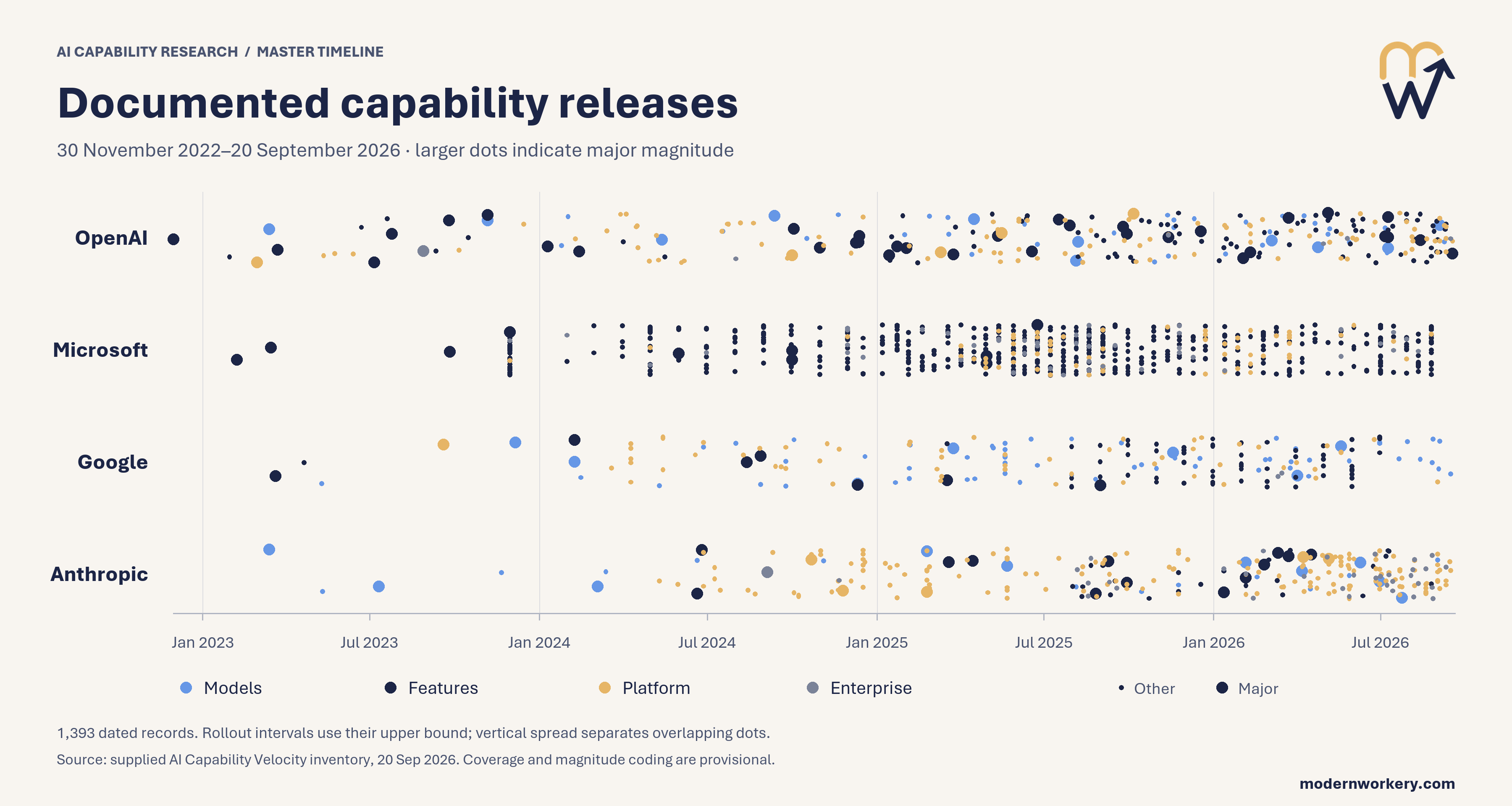
I bet people in your org feel that number even if they have never seen it. Someone forwards a launch video, someone else asks if it's time to switch tools, and the AI committee adds three more items to next month's agenda. Meanwhile the people doing the actual work get another email about another feature they should try (and yes, some of the release notes now have their own release notes).
The pace of AI change isn't going to slow down. What you can control is how much of that change your organization takes in at once.
Think about a family calendar in September. Soccer, piano, robotics, scouts, and travel volleyball all open sign-ups the same week, and every one of them looks great on the flyer. Nobody signs up for all of them because it would be a disaster. Everyone would be exhausted, overwhelmed, and mad at each other. You pick what fits your family, and move on.
What 1,394 Releases Say About the Pace of AI Change
The yearly totals tell most of the story. There were 69 documented releases in 2023, 233 in 2024, and 627 in 2025. This year hit 463 by mid-September- with three months left in the year.
Looking at any 90-day window makes it feel more real. In mid-2023, the four companies shipped about seven releases per quarter combined. Today it's somewhere between 170 and 200 per quarter, which works out to about two new things every single day.
Here's what surprised me most. The big launches, the new model generations and major new products, are increasing pretty steadily. However, most of the growth is in smaller and mid-sized updates: a new setting, a new integration, an existing feature that now works a little differently. Nobody announces those in a town hall, but they're what your people actually run into on a Tuesday afternoon.
All changes matter and create noise-big or small.
The source of the volume moves around, too. Microsoft's AI releases peaked in 2025 at 357, close to one a day, then slowed. In 2026, Anthropic and OpenAI picked up the pace, and Anthropic has already passed its 2025 total. If your organization runs on more than one AI tool, you're catching the updates from all of them at once.
One caveat: these counts come from public release notes and launch posts, and each company documents differently. Read this as a picture of the pace of AI change, not a scoreboard.
The wider research I reviewed lines up with what the release data suggests. The US Census Bureau found 57% of firms using AI use it in three or fewer business functions. Use is spreading fast, but it isn't getting much deeper, and a faster pace of AI change won't fix that.
None of this means your people are doing it wrong. When two updates land every day, grabbing the easy wins and tuning out the rest is a reasonable response, and it points right at what leaders can fix.
Six Ways to Control the Pace of AI Change in Your Org
-
Set a change budget.
Decide how many new AI capabilities each team will adopt per quarter. Start with one or two. If something new comes in, something else has to be fully adopted first or pushed to next quarter. -
Name one owner for intake.
Pick one person (or a small group) to watch Microsoft 365 Message Center, vendor announcements, and what teams are trying on their own. Everyone else can stop reading launch posts at 10pm. - Treat big launches and small updates differently. The two or three major launches a month deserve a real look. The daily stream of smaller updates gets batched and reviewed once a month, not chased one at a time.
-
Hold a 30-minute monthly release review.
The owner brings what changed. The group sorts each item into Now, Next, or Not For Us. Most things land in Next, and that's a healthy result. -
Tie every change to a workflow you already care about.
List your team's top five workflows. If a new feature doesn't make one of them better, it waits, no matter how good the demo looked. -
Put AI updates on a predictable schedule.
Pick one day a month for AI updates, like the first Tuesday. People can handle a fast pace of AI change a lot better when they know when it's coming.
Try This: Sort This Month's AI Updates in 15 Minutes
This is the simplest way to turn the pace of AI change into a short list your team can act on. You don't need to know what was released. You just need to know your tools and your work, and the AI does the digging. Paste this into Copilot or the AI tool your team uses:
I lead a team of [number] people in [department]. We use [list your AI tools, e.g., Microsoft 365 Copilot, ChatGPT Enterprise].
Our five most important workflows are: [list them, e.g., client proposals, weekly status reports, month-end close].
Search for new features and updates released for these tools in the last 30 days. Only include updates you can link to an official source from the company that makes the tool.
Sort each update into Now, Next, or Not For Us based on whether it helps one of our five workflows. For each one, give one sentence on which workflow it helps (or that it doesn't help any) and what it would take for my team to start using it.
Limit the Now list to two items and include the source link for each.
Two quick notes. Whether Copilot can search the web depends on your organization's settings. If it can't, delete the search line and paste in whatever AI news has landed in your inbox or Teams this month (the forwarded launch video counts). Either way, click the links on your Now list before you share it, because AI can get release details wrong too.
Take the Now list to your next team meeting and ask one question: "Which of these would save you the most time this month?" Start with that one. Put the Next list in a shared doc so people can see it's coming, which cuts down on the "should we be using this?" messages. After 30 days, check whether the Now item became a habit before you pull anything off the Next list.
About two new AI releases will show up tomorrow, and two more the day after. The family calendar still works in September because somebody decided what fits.