Five AI Adoption Problems That Quietly Stall Your Rollout

Most AI adoption problems are not technology failures. They are habit, clarity, and leadership gaps. Here is how to spot each one and fix it.
It is month three of your AI rollout. The launch went well. People clapped in the all-hands. Then a license renewal email lands, and someone in finance asks the question you have been avoiding: "Are people actually using this?"
You think so. You hope so. But "I think so" does not hold up in a budget meeting.
Here is what we have learned helping teams roll out Copilot and other AI tools: rollouts rarely fail loudly. They fade. And almost every fade traces back to one of five AI adoption problems.
The good news is that each one has a tell, and each one has a fix you can start this week. Where a usage dashboard exists (the Microsoft Copilot Dashboard, for example), the numbers make these problems easy to see. Where it does not, the signals are still there in plain sight.
Problem 1: The idle license
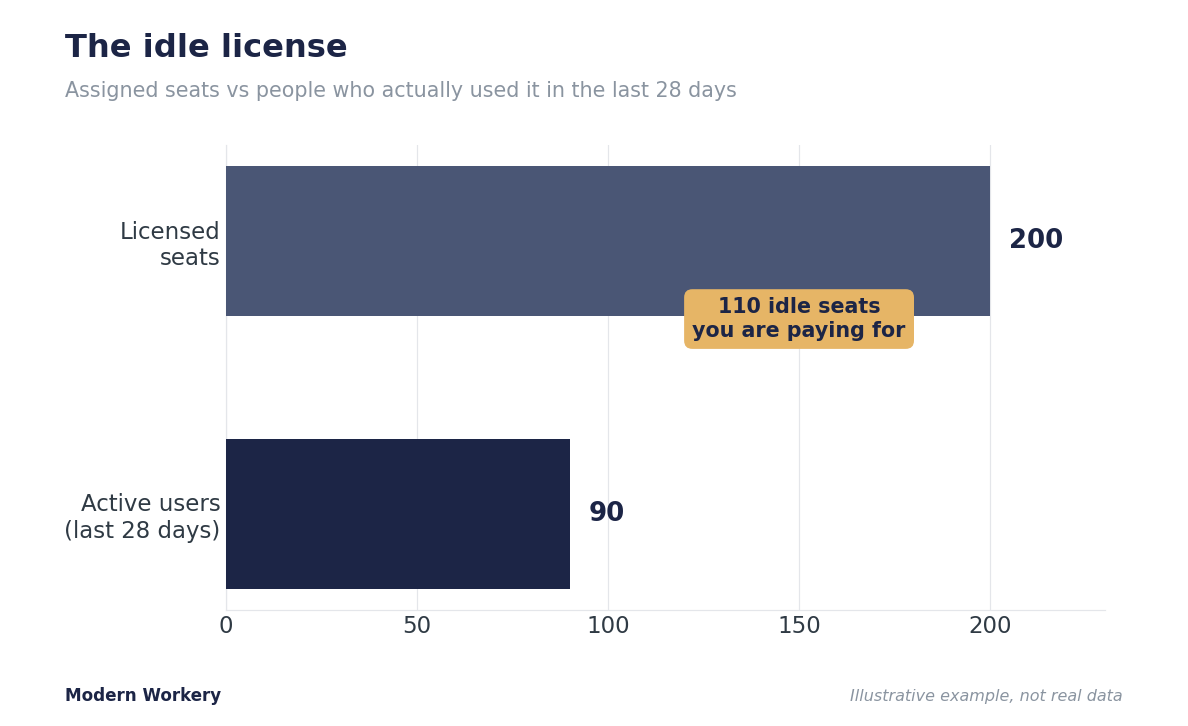
People got the tool. They are not opening it. This is the most expensive AI adoption problem because you are paying full price for seats nobody uses.
What to look for: A wide gap between licenses assigned and people actually active. In the Copilot Dashboard, compare "licensed employees" to "active users" (anyone who took at least one action in the last 28 days). If you bought 200 seats and 90 are active, that is not adoption, that is a refund waiting to happen. No dashboard? Ask your IT or tenant admin to pull active versus licensed counts, or run a two-question pulse survey.
What to do: Do not buy more seats and do not panic. Pull the list of inactive users and find the pebble in the shoe (something that is annoying and slows them down).
It is almost always one of three things: they forgot it exists, they do not know what to ask it, or they tried once and got burned. Each has a fifteen-minute fix. Start with a short, specific nudge tied to a task they already do.
Problem 2: The week-three cliff
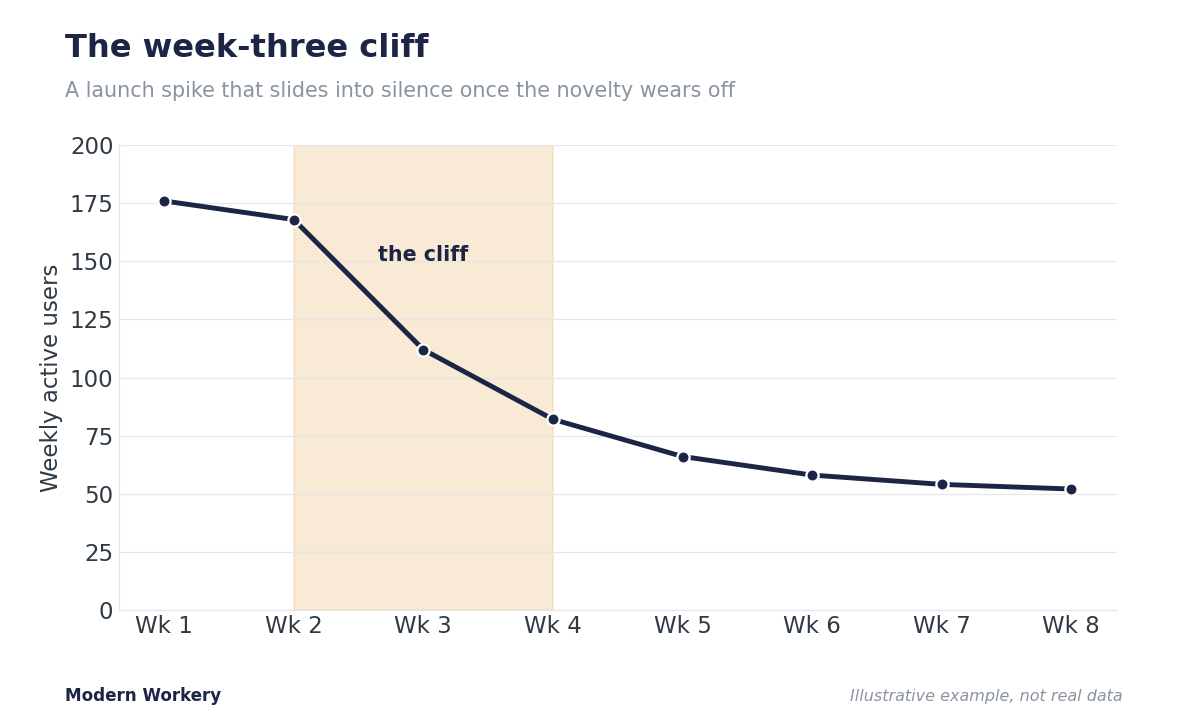
People try AI once, get an underwhelming answer, and quietly go back to their old way of working. The tool got installed. The habit never did.
What to look for: A spike at launch followed by a slide. The Copilot Dashboard shows this in usage intensity and retention, which track how consistently people come back and how many actions they take over time. Without a dashboard, watch your support channel go quiet and your champions stop mentioning it.
What to do: Build one habit instead of teaching ten features. Anchor AI to a moment that already happens every week. This is the heart of our BORE framework: start people on tasks that are Boring, Overhead, Routine, and Easy to delegate. Nobody protects their weekly status update or their meeting notes, which makes those the perfect on-ramp. One habit that sticks beats ten features nobody remembers.
Problem 3: The one-app wonder
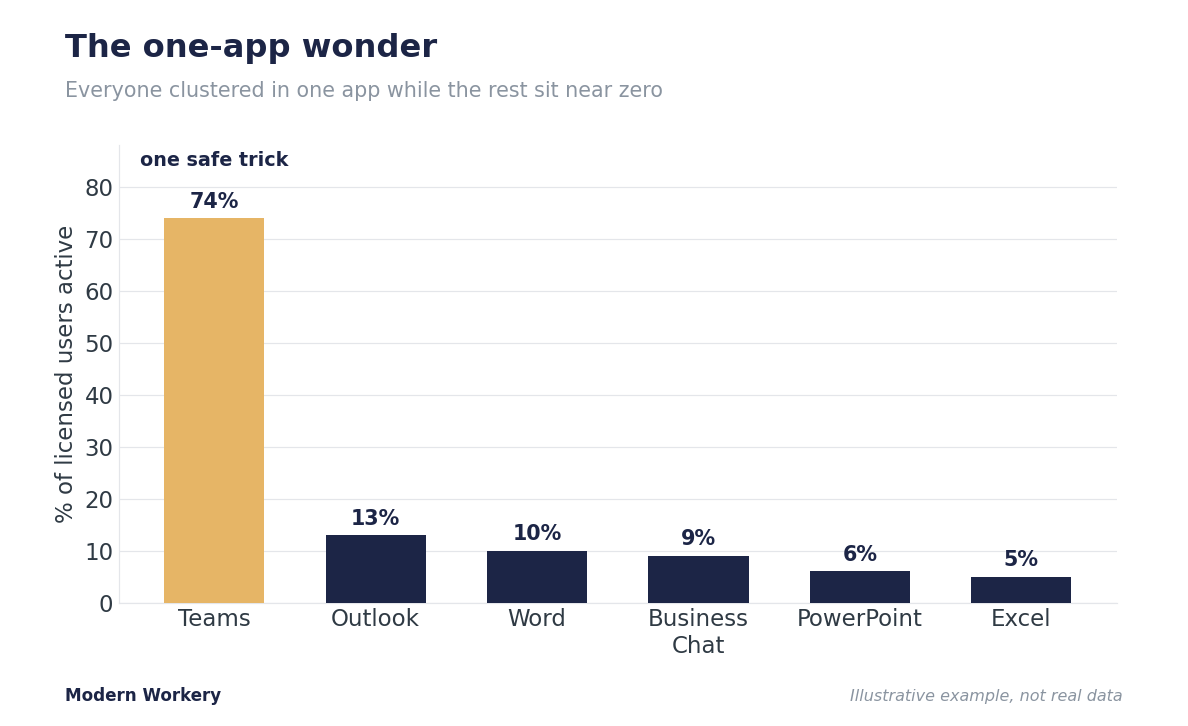
Everyone found one safe trick and stopped exploring. Usually it is meeting recaps in Teams, while every other tool sits untouched. The value is real but tiny, and it will not grow on its own.
What to look for: Usage clustered in a single app. The Copilot Dashboard's "adoption by app" view breaks out active users across Word, Excel, PowerPoint, Outlook, Teams, and Business Chat. A healthy rollout shows life in several. A stalled one shows everyone in one place and near zero everywhere else. No dashboard? Ask your team what they used AI for last week. If every answer is the same, you have a one-app wonder.
What to do: Give them the next rung. Move people up the AI Value Ladder, from Assist to Structure to Delegate. Show the Teams crowd how to turn a meeting recap into an Outlook draft, then into a Word summary. You are not adding apps. You are connecting the ones they already touch.
Problem 4: The leadership gap
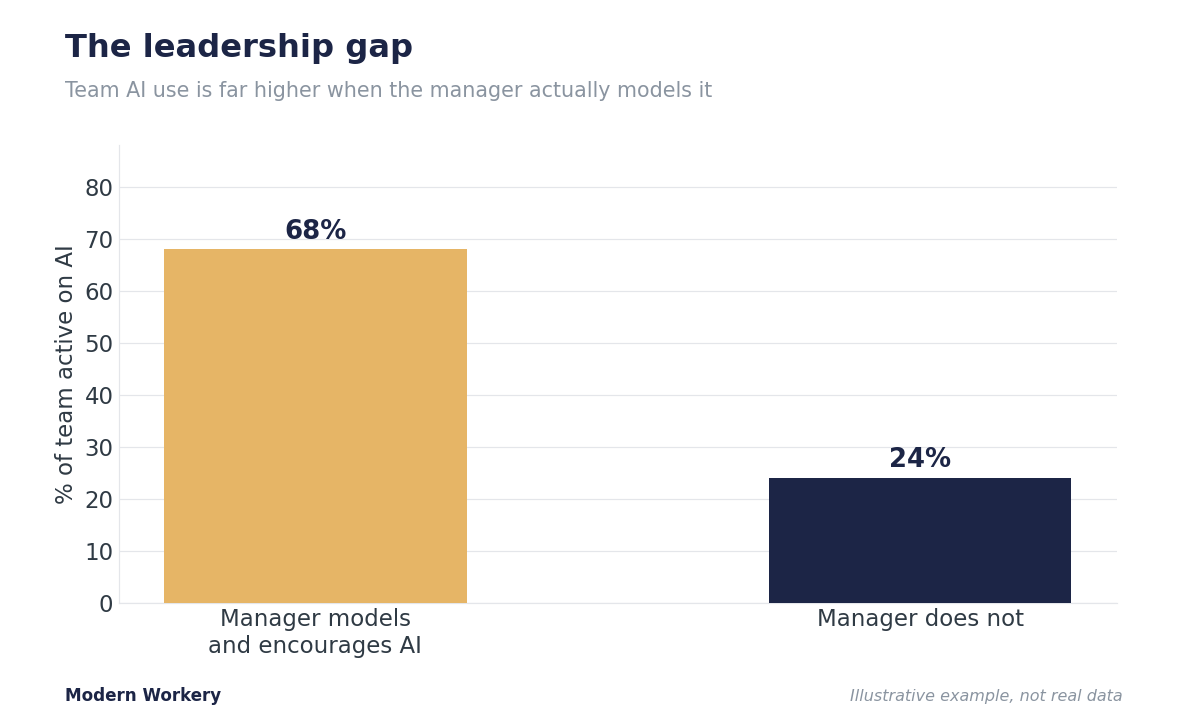
Leaders said "go use AI," then never touched it themselves. Teams read that gap instantly. If the boss is not using it, it must not be that important.
What to look for: This one rarely shows in a dashboard, so watch behavior. Are leaders referencing AI-assisted work in meetings? Are managers asking their teams how they are using it, or has it dropped off every agenda after launch? A quick pulse question ("Does your manager actively encourage AI use?") surfaces it fast. Low scores in management groups on a benchmark view are a hard signal if you have one.
What to do: Get one visible leader to model one real use out loud. Not a keynote. A manager saying "I drafted this update with Copilot, here is what I changed" in a normal team meeting does more than any launch email. Make AI use a standing two-minute item in existing meetings, not a separate initiative.
Problem 5: The missing use case
People are willing. They just do not know what to use it for. So they default to nothing, or one trivial task, and call it a day.
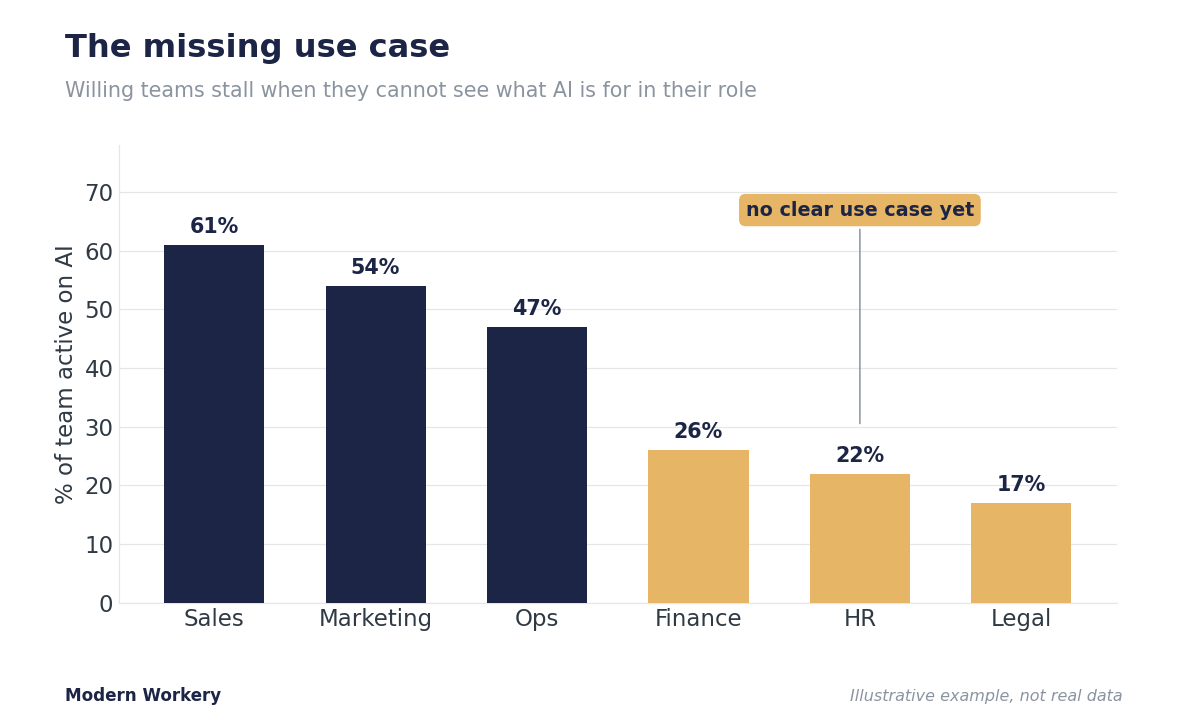
What to look for: Repeated "what do I even use this for?" questions in help channels, low adoption concentrated in specific roles, and lukewarm sentiment scores where the tool tracks them. When usage is uneven by job function and the low teams are the ones without obvious use cases, this is your problem.
What to do: Hand people a short, role-specific starter list, not a generic feature tour. Three prompts a finance analyst will actually use beats fifty they will not. Run a thirty-minute working session where each person writes down their three most boring recurring tasks (the BORE list again) and tries AI on one of them live. Specific beats comprehensive every time.
Try This 10-Minute Exercise
Pick the one problem above that sounds most like your team. Write down a single signal you could check this week to confirm it (an active-user count, a quiet support channel, a one-app pattern, a pulse question). Then write the one action you will take if you are right. That turns a vague worry into a plan. Block fifteen minutes on your calendar to run it.
Think of AI adoption like a garden. You planted the AI, now you watch what is actually growing, pull the weeds slowing people down, and feed the parts taking root.
Adoption is not a launch event. It is something you tend.
The teams that win with AI are not the ones with the most licenses or with the flashiest rollout. They are the ones who find the one adoption problem that matters most this month and fix that one thing.
Action on something simple beats a perfect plan nobody runs.
So which of the five did you just recognize?
Stay connected with news and updates!
Join our mailing list to receive the latest news and updates from Modern Workery.
We hate SPAM. We will never sell your information, for any reason.